Movement Budgets
Track per-turn movement distances with a dynamic colored ruler, optionally enforce movement caps, and roll back accidental token moves with one click.
What it does
Every tracked token has a remaining movement budget. While dragging a token:
- The ruler draws in green while the move is within budget.
- The ruler turns red once the move exceeds the budget.
- The movement pill on the Crawl Strip card counts down remaining feet in real time.
Movement limits are purely visual by default. You can enable hard move refusals in settings if your table prefers strict enforcement.
Which tokens are tracked
| Mode | Tokens tracked |
|---|---|
| Crawl (out of combat) | Tokens added to the crawl roster via Add Tokens |
| Combat | All owned tokens in the active combat encounter |
Movement is not tracked when the crawl is stopped.
Where budgets come from
Because Shadowdark does not use per-character speed attributes on sheets, budgets are configured via module settings and NPC stat blocks:
| Situation | Movement budget | Default |
|---|---|---|
| Crawl (any token) | Out-of-combat movement budget |
90 ft |
| Combat (PC token) | Combat movement default |
30 ft |
| Combat (NPC token) | NPC's system.move stat block entry |
See table below |
NPC movement in combat
NPC movement values map from standard Shadowdark distance keywords:
| Keyword | Distance per turn |
|---|---|
| None | 0 ft (immobile) |
| Close | 5 ft |
| Near | 30 ft |
| Double near | 60 ft |
| Triple near | 90 ft |
| Far | 120 ft |
| Special | Falls back to combat default (30 ft) |
Unrecognized or blank values use the combat default.
When budgets reset
Movement budgets refill automatically upon these triggers:
| Event | Result |
|---|---|
| Next Round on Crawl Bar | Refills all crawl roster movement budgets |
| Full cycle of Crawl Order | Advancing past the last party member resets all budgets |
| Combat round / turn change | Active combatant receives a fresh movement budget |
| Movement Rollback | Restores the token's turn-start budget and position |
Enforcement settings
Configure strict movement rules under Configure Settings → Shadowdark Enhancer:
| Setting | Default | When enabled |
|---|---|---|
| Enforce out-of-combat movement budget | Off | Refuses crawl moves exceeding budget |
| Enforce combat movement budget | Off | Refuses combat moves exceeding remaining movement |
| Lock movement out of turn | Off | Only the token holding the active turn may move |
How out-of-turn locking works
- In combat: Only the active combatant may move.
- During a crawl: Only the party member whose turn it is in the Crawl Order may move (active once all members have rolled initiative).
- GM override: GMs can always move any token freely.
With enforcement disabled, remaining movement can drop into negative numbers
(for example, -10/30 ft) to show how far past the budget a token moved.
Rolling back a move
The module snapshots each token's position at the beginning of its turn.
To revert a move:
- Right-click the token to open Foundry's token HUD.
- Click the Rollback Movement button (the circular arrow in the left column).
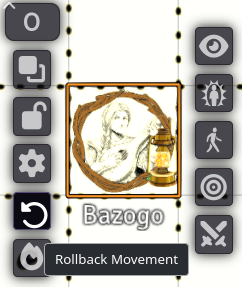
The token instantly snaps back to its turn-start coordinates, its movement budget is refunded in full, and a notification confirms the rollback.
Players can roll back their own tokens. The action executes on the active GM client to ensure state consistency.
Troubleshooting
\"No turn-start position recorded for this token.\"
The token was placed after the round started, or combat began before the crawl
was initiated. The position will be recorded automatically at the next turn or
round change.
Movement is not being deducted.
Ensure the crawl session is active (End button shown on Crawl Bar) and that
the token has been added to the crawl roster via Add Tokens.
The ruler stays green beyond the budget limit.
Remaining movement resets each turn. If a token has not moved yet in the current
turn, cycle the turn or advance the round to ensure fresh state.
A ghost ruler trail remains on canvas.
Selecting another token or clicking the canvas clears lingering ruler lines.
Known limitations
- Uniform terrain cost: Grid movement does not calculate difficult terrain multipliers.
- Single movement mode: Special movement types (fly, swim, burrow, climb) use the standard budget.
- No encumbrance penalty: Encumbered status does not automatically reduce movement budgets.
Related: Crawl Strip & Crawl Bar · Settings Reference