Character Builder
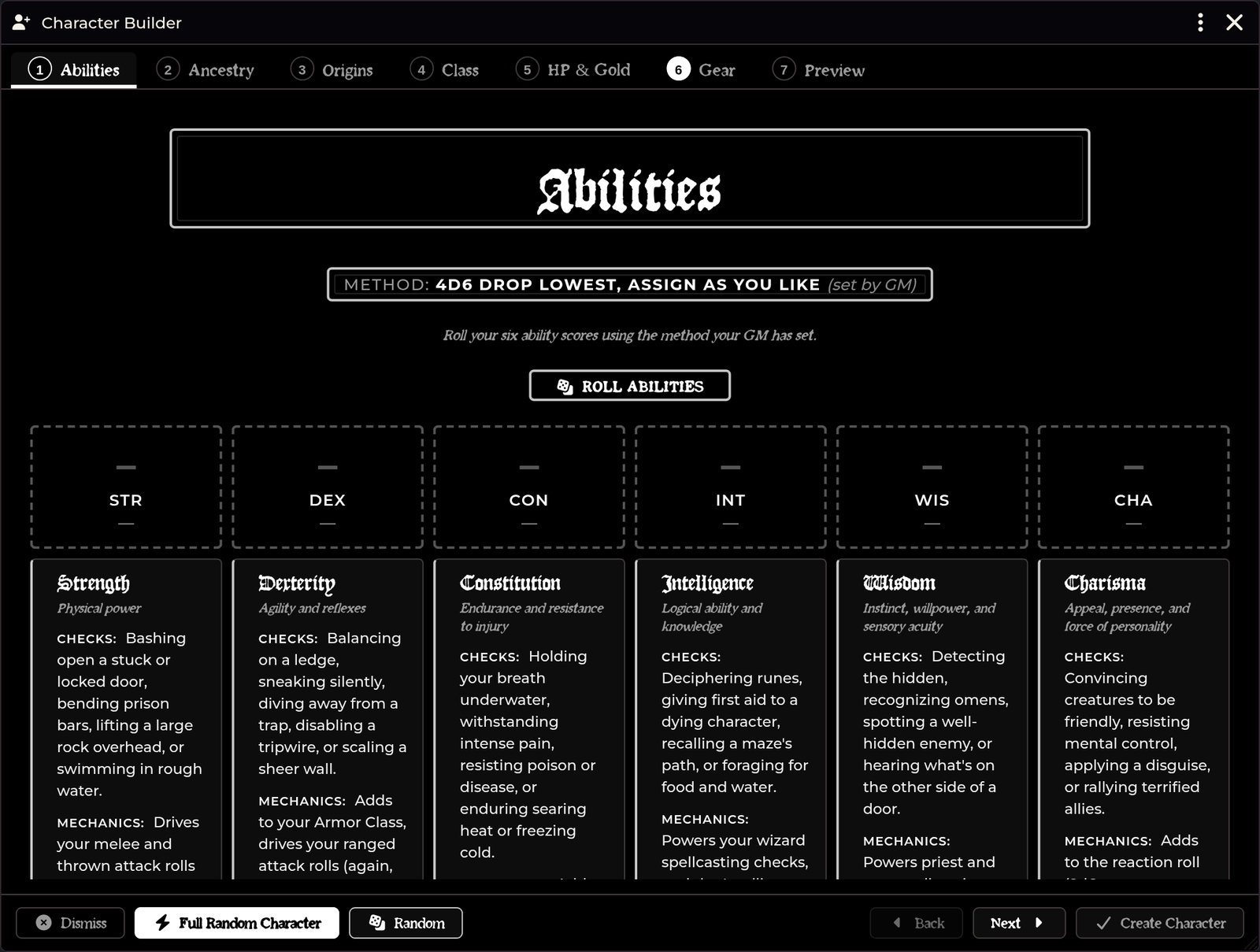
A guided, ordered character-creation wizard designed as a step-by-step alternative to the system's random generator. It creates a complete level-1 character—including rolled hit points and chosen class talents—so the sheet never re-prompts you with level-up popups afterwards.
Opening it
| Route | How |
|---|---|
| Actors sidebar | Click Character Builder in the sidebar header. Visible to all users. |
| API | game.shadowdarkEnhancer.charBuilder.open() |
| Build onto existing sheet | game.shadowdarkEnhancer.charBuilder.open({ actor }) |
Players can build characters freely. If a player lacks actor-creation permissions, the builder transparently hands off document creation to the GM over system sockets.
The seven steps
You can navigate freely between steps in any order. Each step displays a completion checkmark once satisfied. Any section with rollable elements includes a Random button, and the first step provides a Full Random button for a one-click character.
1. Abilities
The generation method is GM-dictated. You configure it as a world setting; players see your chosen method in the builder and cannot change it.
| Method | What it does |
|---|---|
3d6 down the line |
Rolls straight down (STR through CHA) with no reordering. |
3d6, reroll if none ≥ 14 |
Core rules full-array reroll when no stat hits 14. Default. |
3d6, assign as you like |
Rolls a visible 6-die pool for you to place into stats. |
4d6 drop lowest, down the line |
Rolls 4d6 drop lowest down the line. |
4d6 drop lowest, assign as you like |
Rolls 4d6 drop lowest into a visible pool to assign. |
| Standard Array | Fixed pool 15, 14, 13, 12, 10, 8 to assign as you like. |
| Point Buy | 27-point budget across scores 8–15 (costs: 8:0, 9:1, 10:2, 11:3, 12:4, 13:5, 14:7, 15:9). |
For assignment methods (and Standard Array), click a value in the pool and then click the target ability score to place it.
Point Buy starts every score at 8 and allows adjusting abilities between 8 and 15 within the 27-point total budget.
Every roll posts an audit card to chat so rolls remain transparent. The 3D Dice So Nice animation is optional and toggled in settings; the chat audit card posts either way.
The step also includes a quick reference explaining what each ability does in Shadowdark.
2. Ancestry
Browse ancestries live from all installed compendiums, complete with portrait art.
- Multi-talent ancestries (like Elf) let you pick your talent directly here.
- Name and Trinket fields let you pick from roll tables, roll randomly, or type custom entries.
3. Origins
Select Background, Alignment, and Deity on a single screen. The random Deity selector is automatically weighted toward your chosen alignment.
4. Class
This step configures class progression details:
- Level-1 features shown up front
- The
2d6class talent table roll, logged to chat - Talent choices (such as Weapon Mastery, Armor Mastery, or spell advantage) selected inline rather than via popups
- Bonus rolls: Human Ambitious talent, Black Lotus, and patron boons
- Patron selection for classes that require one
- Per-tier spell picker enforcing class spells-known limits
- Language selection: fixed languages plus choose-N pools
5. HP & Gold
Roll your class hit die with Constitution modifiers applied automatically. Talent HP bonuses (such as Dwarf Stout) are included without double-counting.
| Setting | Effect |
|---|---|
| Max Level-1 HP | Sets starting HP to hit-die maximum + CON instead of rolling. |
| Fixed starting gold (gp) | Flat starting gold. Set to 0 to roll the standard 2d6 × 5 gp. |
6. Gear
A starting equipment shop browsing Weapons, Armor, and Basic gear across all installed packs. Items your class cannot use are flagged. The cart tracks against your starting gold and carry slots, deducting spent coins on finish.
GMs can grant extra starting gear (such as magic items or potions) via Configure Settings → Character Builder — extra gear → Manage Extra Gear.
7. Preview
Review a summary of all your character choices and set artwork.
Setting character art
Ordered by required permissions:
| Route | Permission needed |
|---|---|
| Use Suggested Art (bundled portrait) | None |
| From URL… (paste image link) | None (no GM required) |
| Portrait / Token from gallery | None (proxied through GM) |
| File browser (Foundry picker) | FILES_BROWSE |
Art is optional. Leaving it blank uses system defaults.
The artwork gallery
- Reachable for everyone: Dedicated Portrait from gallery and Token from gallery buttons sit on the Preview step for all users. Players without file permissions route through the gallery automatically.
- Matched pairs and autofill: Gallery entries represent characters with matching portraits and tokens. Picking an artwork fills both portrait and token if the other slot is empty. If a slot already holds art, picking only updates that slot, preserving deliberate mismatches. Clicking Reset art clears both slots.
- Search and facet filters: A left sidebar provides a search box and collapsible tag filters (multi-select: ANY within a group, ALL across groups).
- Ancestry filtering: The gallery opens pre-filtered to the character's chosen ancestry. Half-ancestries list exact matches before parent ancestries.
- Hover preview: Hovering any tile opens an enlarged floating preview.
- Datasheet convention: The gallery reads
flags.galleryDatasheetsmanifests from any active module that publishes them. No specific module is required; without one, it browses the configured image folders directly.
Gallery folders are set via Character Builder — portrait/token art folders
(defaults to assets/portraits, assets/ancestries).
Clicking Finish commits the character through the system's creation path: ancestry, class, background, and deity are stored as references, while talents, spells, and items are embedded directly onto the sheet.
Content discovery
Ancestry Names, Trinkets, Backgrounds, and Deities discover roll tables automatically by matching table names. Imported Western Reaches or homebrew tables work immediately without extra configuration.
The builder also updates live when you import new content through the Importer Hub.
Attribution
Pathfinder Tokens: Character Gallery
Artwork and portraits from Pathfinder Tokens: Character Gallery are copyright © Paizo Inc. Used under license in Foundry VTT. Token ring integration and portrait selection enable automatically when installed.
Troubleshooting
A player cannot change the ability generation method. The method is GM-dictated. Change it in Configure Settings → Character Builder — ability roll method.
An imported class does not appear.
The builder filters on system.source.title. Ensure the class was committed
with a valid source label rather than under Custom.
An imported caster class offers no spells. The class may have imported as a non-caster because its spellcasting text was merged into the talent table. See Class & Spell Importers.
Players see no gallery art. Verify the art-folder setting is populated and that target folders exist on disk.
A player receives a file-permission error. They used the raw file browser button. Direct them to Portrait from gallery, Use Suggested Art, or From URL…, none of which require file permissions.
The sheet prompts for level-up after creation. The builder handles level-1 talent and HP choices. If this happens, ensure the class item contains its proper level-1 feature links.
Dwarf Stout gave too much HP. Talent HP bonuses apply once automatically. If double-counting occurs, please report it on GitHub.
Related: Class & Spell Importers · Export to PDF · Settings Reference