Mounts & Boats
Two Actor sub-types with dedicated sheets, for Western Reaches mounts, warband units, boats, and siege vehicles.
Creating one
Go to Actors sidebar → Create Actor, then choose Mount or Boat from the type dropdown. They register at world load alongside core types.
Manifest changes require a world relaunch, not a browser reload. If the actor types do not appear after updating the module, relaunch the world.
Mount
The Mount type reuses the Shadowdark system's NPC data model and sheet. Because a mount is a creature, its Abilities, Description, and Effects tabs are pixel-identical to a native NPC, accepting standard Attacks, Features, and Spells.
On top of the standard sheet, Mount adds three tabs:
| Tab | Contents |
|---|---|
| Riders | Party-style occupants. Drag and drop actors here. |
| Inventory | Physical gear. Attacks, features, and spells stay on their own tabs. |
| Mount | Dedicated mount-rule fields. |
Occupants and mount fields live in actor flags, keeping full compatibility with the core system data model.
Boat
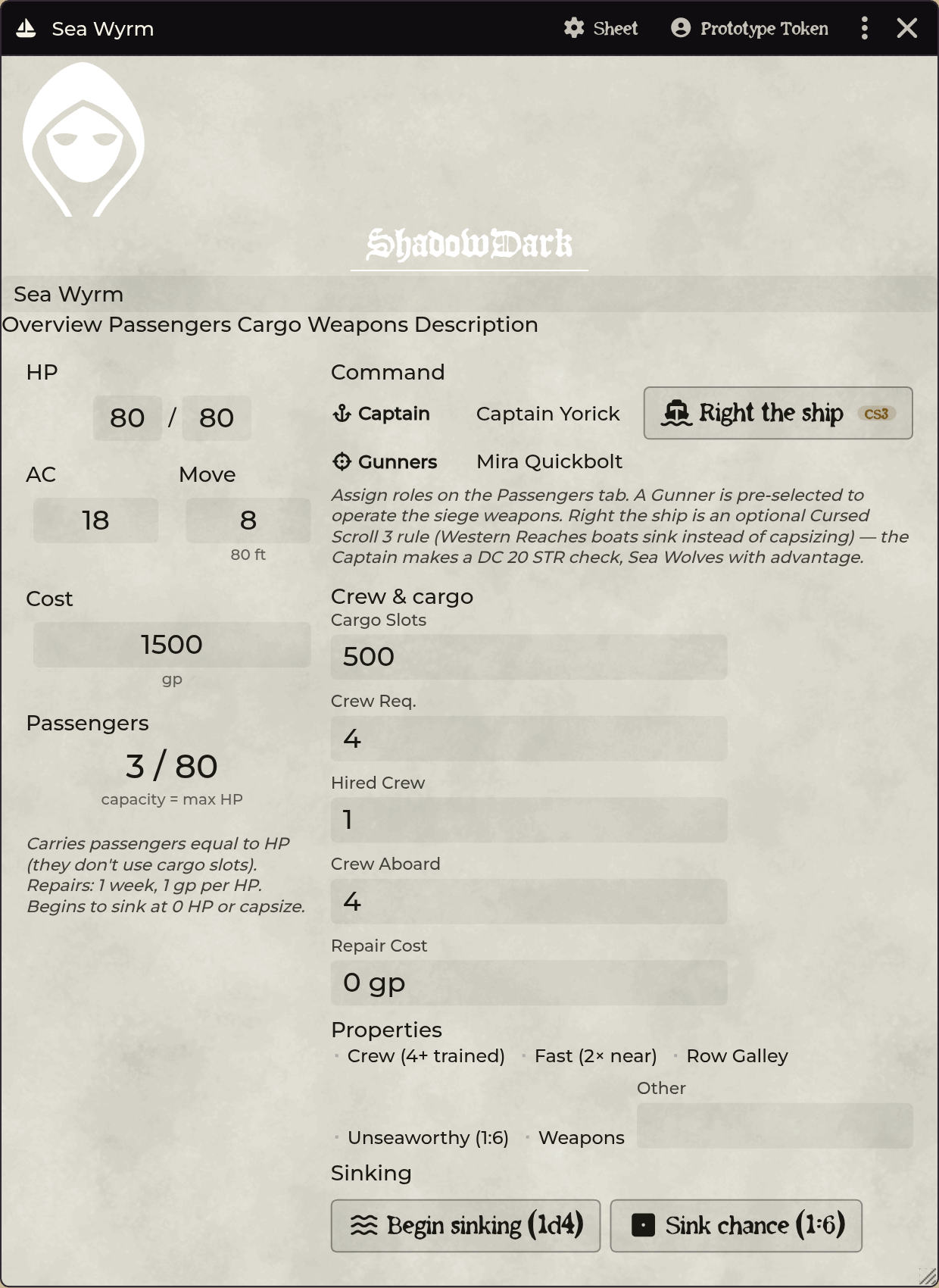
A party-like vehicle container featuring five tabs:
| Tab | Contents |
|---|---|
| Overview | Vessel stats (HP, AC, Speed, Cost, Capacity), Command roster, and sinking tracker. |
| Passengers & Crew | Occupant roster with role selectors (Passenger, Captain, Gunner, Crew). |
| Cargo | Inventory tracked against cargo slots. |
| Weapons | Mounted siege weapons (up to 2) with inline roll buttons. |
| Description | Free-form notes rendered on high-contrast parchment. |
Crew roles
Assign each occupant a role on the Passengers & Crew tab. The role displays as a badge (⚓ Captain, 🎯 Gunner) and enables vehicle actions:
- Captain: Controls the vessel. The Overview Command box displays the captain and a Right the ship (CS3) button. (Righting a capsized vessel is an optional Cursed Scroll 3 rule using DC 20 STR; Sea Wolf captains roll with advantage automatically).
- Gunner: Operates siege weapons. Firing a weapon on the Weapons tab pre-selects the assigned gunner.
- Crew: Trained hands operating the vessel.
Crew requirements: WR's Crew (C) property requires 4+ trained crew to move. The Crew aboard counter tallies Captains, Gunners, Crew, and the Hired crew field. Plain Passengers do not count toward crew requirements.
Boat types
Canoe · Galleon · Junk · Longboat · Raft · Rowboat · Sailboat · Sloop · Custom
Siege weapons
Mount up to two siege weapons (trebuchets restricted to galleons) on the Weapons tab by dragging them from a compendium.
Sinking countdown
The Overview tab provides controls for taking on water: begin sinking, advance countdown, stop sinking, and sink chance rolls.
Capacity
Passengers do not consume cargo slots. They are tracked against the vessel's HP-derived passenger capacity, reported separately from cargo slot limits.
Description
The Description tab provides a notes area for vessel lore and port history, styled on high-contrast parchment for light and dark theme readability.
Importing Western Reaches mounts
Seven Western Reaches mounts are not in the core bestiary: Camel (silver),
Donkey, Horse (prized), Horse (war), Pony, Scrag, and Scrag (war). The other
eight on pp. 116–117 ship in shadowdark.monsters.
Open Importer Hub → Manage → Monsters → Mounts to see the full catalog. Unimported mounts show an Import button (cited to WR pp. 116–117).
Clicking Import extracts those pages from your own uploaded WR PDF, parses the
statblocks, and previews the requested mount. Committing saves it directly into
the sde-actors compendium under the Mounts folder as a Mount
actor with full statblock and custom tabs.
Mount names match both catalog style (Horse, War) and book style (WAR HORSE). Mounts already in your library are skipped automatically.
Bulk import: Click Import everything (or Import all N in Mounts) to process the entire spread in one go. The batch reports each mount as created, already present, or skipped.
Importing Western Reaches boats
The eight boats from the Western Reaches Player's Guide (p. 118: Canoe, Galleon, Junk, Longboat, Raft, Rowboat, Sailboat, Sloop) import as ready-made Boat actors.
Like all unlocks, no stats are bundled. The importer parses the table from your
own PDF (or a pasted text snippet) and commits Boat actors into sde-actors.
Three ways to open the boat importer:
- Importer Hub → Manage → Vehicles → Boats: Click Import on any unowned boat to grab the page table.
- API: Run
game.shadowdarkEnhancer.actors.importBoats(). - Manual Paste: In Importer Hub, set type to Boats, paste the table, and click Create boats.
Imported boats include full stat lines: HP, AC, speed, cargo slots, crew requirements, properties, and purchase costs.
Siege weapons
The four Western Reaches siege weapons (Ballista, Catapult, Crossbow (heavy),
Trebuchet) from p. 119 import into sde-items under Importer Hub → Manage →
Vehicles → Siege Weapons.
Each weapon includes damage, range, cost, 30-slot bulk, and Blast / Exploding properties (created as native Property items), along with Siege Weapon Ammunition (1 gp, 2 slots).
To arm a boat, open its Weapons tab and drag a siege weapon from the compendium onto the sheet.
Each mounted weapon includes Attack and Damage buttons:
- Attack: Selects the operator and roll mode (Normal / Advantage /
Disadvantage (untrained)). Rolls 1d20 + the operator's ranged attack bonus.
- Damage: Rolls the weapon's damage dice (e.g. 5d6 for trebuchet).
Troubleshooting
Mount and Boat are missing from the Create Actor list. Relaunch your world. Manifest sub-types require a server restart rather than a browser reload.
A dropped actor did not become an occupant. Drop the actor token or sheet directly onto the Riders (mount) or Passengers & Crew (boat) tab rather than the Overview tab.
The mount sheet looks like a plain NPC sheet. The extra Riders, Inventory, and Mount tabs appear alongside standard NPC tabs. If missing, check for module load conflicts.
Cargo slots and passenger capacity disagree. These are separate limits. Passengers track against HP capacity; cargo tracks against inventory slots.
The mount import says "No mount statblocks found".
The extracted PDF page lacked valid AC … LV stat lines. Paste pp. 116–117
manually into the text box.
An imported mount is stored as a Roll Table instead of an Actor. Delete the legacy roll table and re-import the mount from the Importer Hub.
The boat import says "No boats found — paste the table". The PDF extractor could not parse the table cleanly. Paste the p. 118 BOATS table directly into the input box.
An imported boat was not created. If a boat with that name already exists in your library, the importer skips it to prevent overwriting. Rename or delete the existing actor to re-import.
Related: Compendium Packs · Importer Hub