Monster Token Art
Re-skin the Shadowdark bestiary with token art you already own, referenced by file path, never copied or bundled.
The licensing position, up front
This tool redistributes nothing. It writes a configuration mapping that
points Foundry at image files already sitting in your Data/modules folder. If
you do not own an art pack, it does not appear in your source list and nothing
about it is shipped in this module.
Because art is referenced by local path rather than hosted on the server, art follows your install. Any connected player who does not have the corresponding art module installed will see default images instead.
Opening the manager
Open the manager through either method (GM-only):
- Actors sidebar: Click the Monster Art button at the top of the sidebar.
- API: Run
game.shadowdarkEnhancer.tokenArt.openManager().
Supported art sources
Sources are auto-discovered from what you have installed. Any pack not present on disk is omitted from the list. Recognized sources include:
| Source | Where it looks |
|---|---|
| Monster Manual | modules/dnd-monster-manual (includes dynamic rings and per-token scale) |
| Player's Handbook | modules/dnd-players-handbook (PC and humanoid NPC art) |
| Pathfinder: Monster Core | modules/pf2e-tokens-monster-core |
| Pathfinder Tokens: NPC Core | modules/pf2e-tokens-npc-core (townsfolk, soldiers, cultists with scale and dynamic rings) |
| Pathfinder: Character Gallery | modules/pf2e-tokens-characters (token, portrait, and subject art with scale and rings) |
| Shadowdark Community Tokens | modules/shadowdark-community-tokens (both artwork/ and monster24/ trees) |
| Too Many Tokens | modules/too-many-tokens-dnd (16,000+ token images available in Browse) |
| Forgotten Adventures | systems/dnd5e/tokens (bundled with the dnd5e system) |
Any other pf2e-tokens-* pack |
Auto-detected, including iconic PC and companion portraits |
Note: Art modules only need to be installed on disk, not necessarily enabled in the world's Manage Modules list.
How art gets matched
When evaluating candidate art for a monster, the matcher checks in this order:
- A source's own mapping file, when the pack includes a compendium art map specifically keyed to Shadowdark.
- Exact name match against filenames in the source's token directory.
- Semantic aliases: Shadowdark renames several classic fantasy creatures to avoid trademarked terms. The matcher checks both names:
| Shadowdark | Also tried |
|---|---|
| Brain Eater | Mind Flayer, Illithid |
| Stingbat | Stirge |
| Mushroomfolk | Myconid |
| Grimlow | Grimlock |
| Smilodon | Saber-toothed Tiger |
| Viperian | Yuan-ti, Serpentfolk |
| Deep One | Kuo-toa |
| Angel Principi / Domini / Archangel | Deva / Planetar / Solar |
| Peasant · Soldier | Commoner · Veteran |
(Snake and swarm naming variations across packs are also resolved.)
- Fuzzy matching: Matches similar names above a configurable similarity threshold.
Shadowdark-original creatures without D&D counterparts are pinned to Community art where available.
Using the manager
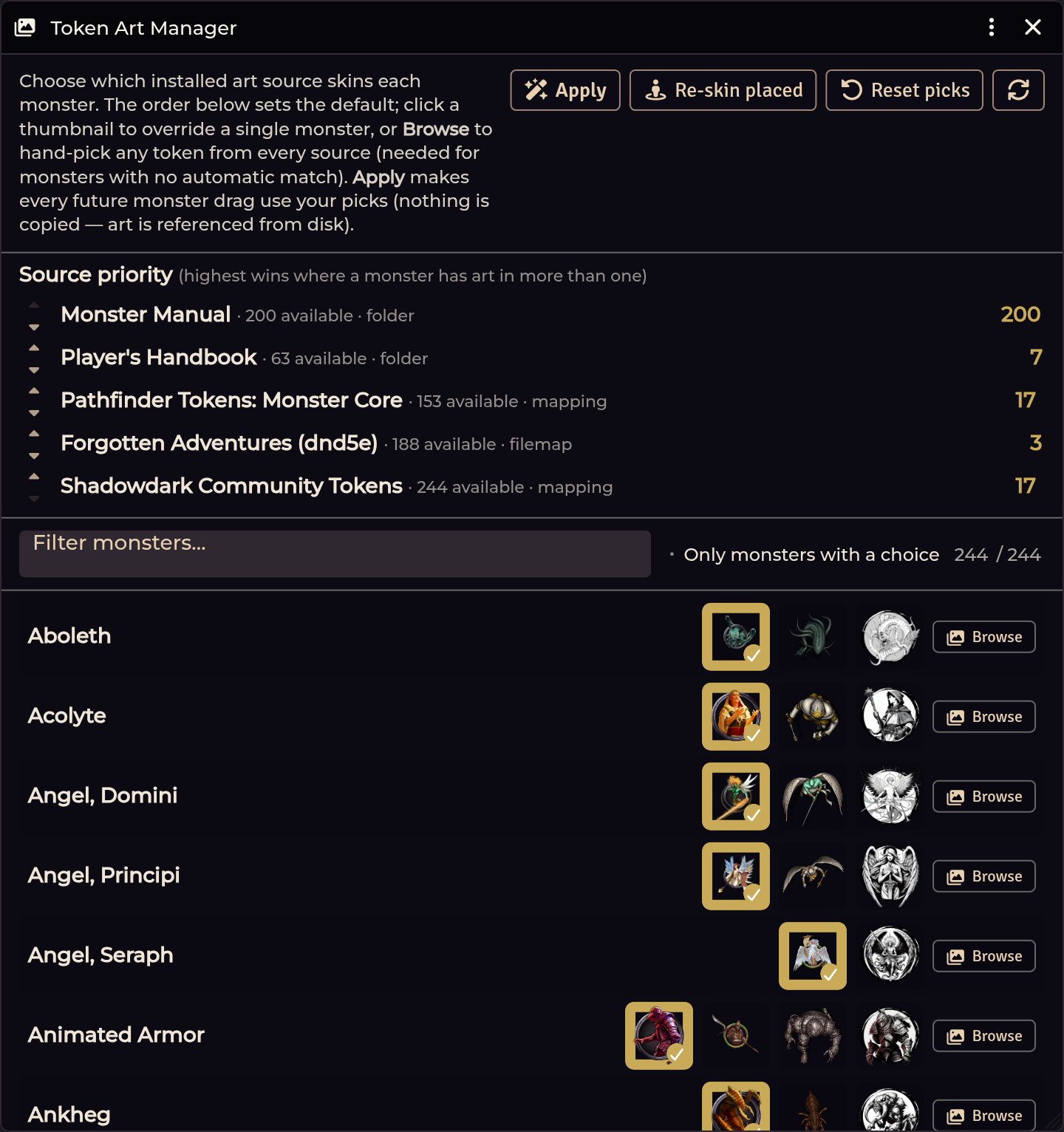
Source priority
Drag rows to reorder your sources. The topmost source with a valid match wins. The small caret buttons remain available for clicking or keyboard navigation.
The Source priority panel and the How this works intro blurb both fold
away into collapsible <details> panels. The manager remembers whether you left
them open or closed across re-renders.
Per-monster overrides
Every monster row can be customized individually. A manual pick always beats source priority.
Hover preview
Hovering any thumbnail on the main monster list or inside the Browse modal pops up an enlarged 340px preview anchored to the window, making it easy to compare candidate art at a glance.
Manual Browse folders
In addition to auto-discovered modules, you can register custom token
directories under Foundry's Data/ directory as named Browse folders:
- Adding a folder: In the Manual Browse folders section, click Add
folder, provide a label (e.g.
My Token Pack), and enter the path (e.g.modules/my-token-pack/tokensorworlds/my-world/tokens). - Validation: Paths are validated via Foundry's
FilePickerbefore saving. Blank inputs, duplicates, and unreadable paths are rejected with a warning. - Browse-only behavior: Manual folders appear as dedicated source sections in the Browse modal. They never participate in automatic or fuzzy matching, so adding a folder will never silently disrupt your compendium defaults.
- Pick retention: Editing or removing a manual folder retains any concrete picks you already assigned to monsters.
- Placed token tracking: When you click Re-skin placed, the manager
updates tokens matching active source roots or tracked in the exact-path
managedPathswitness ledger. Hand-assigned art in sibling directories remains protected from accidental overwrites. - Missing folders: If a folder is temporarily unmounted or missing on disk, it is skipped safely during Browse without console errors.
The image browser
Clicking Browse on any monster opens a searchable visual grid of all installed tokens across your sources (often thousands of images):
- Grouped by source with sticky headers
- Zoomable via slider,
Ctrl+scroll, orCtrl+/-(Ctrl 0to reset) - Filterable as you type
Applying your changes
| Button | Effect |
|---|---|
| Apply | Writes the mapping and injects it at runtime with no world reload needed. All future monster spawns use your picks. |
| Re-skin placed | Updates existing NPC tokens already placed on your scenes. |
| Reset picks | Clears your manual per-monster overrides and restores automatic priority matching. |
To disable the art overlay completely and restore the system defaults, run:
game.shadowdarkEnhancer.tokenArt.restoreCompendium().
Imported monsters and mounts
The art overlay covers the module's managed actor compendium (sde-actors)
alongside shadowdark.monsters, so creatures imported from Cursed Scroll and
Western Reaches through the Importer Hub receive token art
identically to the core bestiary:
- Supported actor types: The manager includes imported NPCs and Mount
documents from
sde-actors. Loose world actors, boats, and core mounts are excluded. - Curated art picks: The manager ships 73 exact reviewed art mappings for imported creatures and mounts (such as Giant Catfish and Western Reaches mounts).
- Unmatched creatures stay Browse-only: Certain creatures are deliberately left unmapped when no suitable art exists. For example, Death Slug and Wendel are slugs, and no slug art exists in any catalogued pack. They remain visible in Browse for you to assign custom art by hand, but the module avoids making bare-name guesses on their behalf.
- Book isolation: Same-name monsters across books (such as CS2 and WR Horse,
War) are tracked under unique source IDs (
<SRC>:<name>) so their art mappings never collide. - Placed-token resolution: When re-skinning placed tokens by name, clashes resolve with a Core-first tiebreak when both have art, falling back to the imported version if Core has no art configured.
(Pathfinder attribution: Sources referencing Pathfinder Tokens: Character Gallery carry the approved credit: "Portrait, token, and subject artwork from the Pathfinder Tokens: Character Gallery.")
Presentation and token scale
Dynamic ring settings, subject coordinates, and token fill scale are inherited directly from the source art pack. Large creatures fill their grid footprint and flat tokens sit correctly without needing manual scale adjustments.
Scripting and macros
const art = game.shadowdarkEnhancer.tokenArt;

// Open the manager window
await art.openManager();

// Generate and inject the runtime overlay
await art.applyToCompendium();

// Re-skin placed tokens on scenes
await art.apply({ scene, actors, portraits, dryRun: false, minScore: 0.7 });

// Match a monster name programmatically
const match = art.resolve(name, sets, source, minScore);

// Restore default system compendium art
await art.restoreCompendium();
Troubleshooting
A source I own is not listed.
The module must be installed under Data/modules with the expected folder
structure (such as an assets/tokens directory). Verify the folder exists on
disk.
Art did not update after clicking Apply.
Apply updates compendium definitions and future actor drops immediately.
Tokens already placed on active scenes require clicking Re-skin placed.
A monster matched the wrong artwork.
Fuzzy matching may find a close match on non-distinctive names. Click Browse
on that monster row to select the correct token by hand. Your override is saved
permanently.
Players see default artwork instead of custom tokens.
Players do not have the art module installed locally. Because art is referenced
by path rather than redistributed, all clients need local access to the asset
files.
Imported monsters have no art.
Ensure the imported monsters reside in sde-actors (the module's managed pack)
rather than as unlinked world actors.
A manual Browse folder displays an error when adding.
The path must point to a valid, readable folder under Foundry's Data directory.
Check for spelling errors and verify file permissions on your host.
Related: Monster Creator · Compendium Packs · CREDITS.md