Monster Creator
Build a Shadowdark creature from scratch, remix an existing one, or roll a new one on your own imported Core Rulebook generator tables, then save it as a real world Actor.
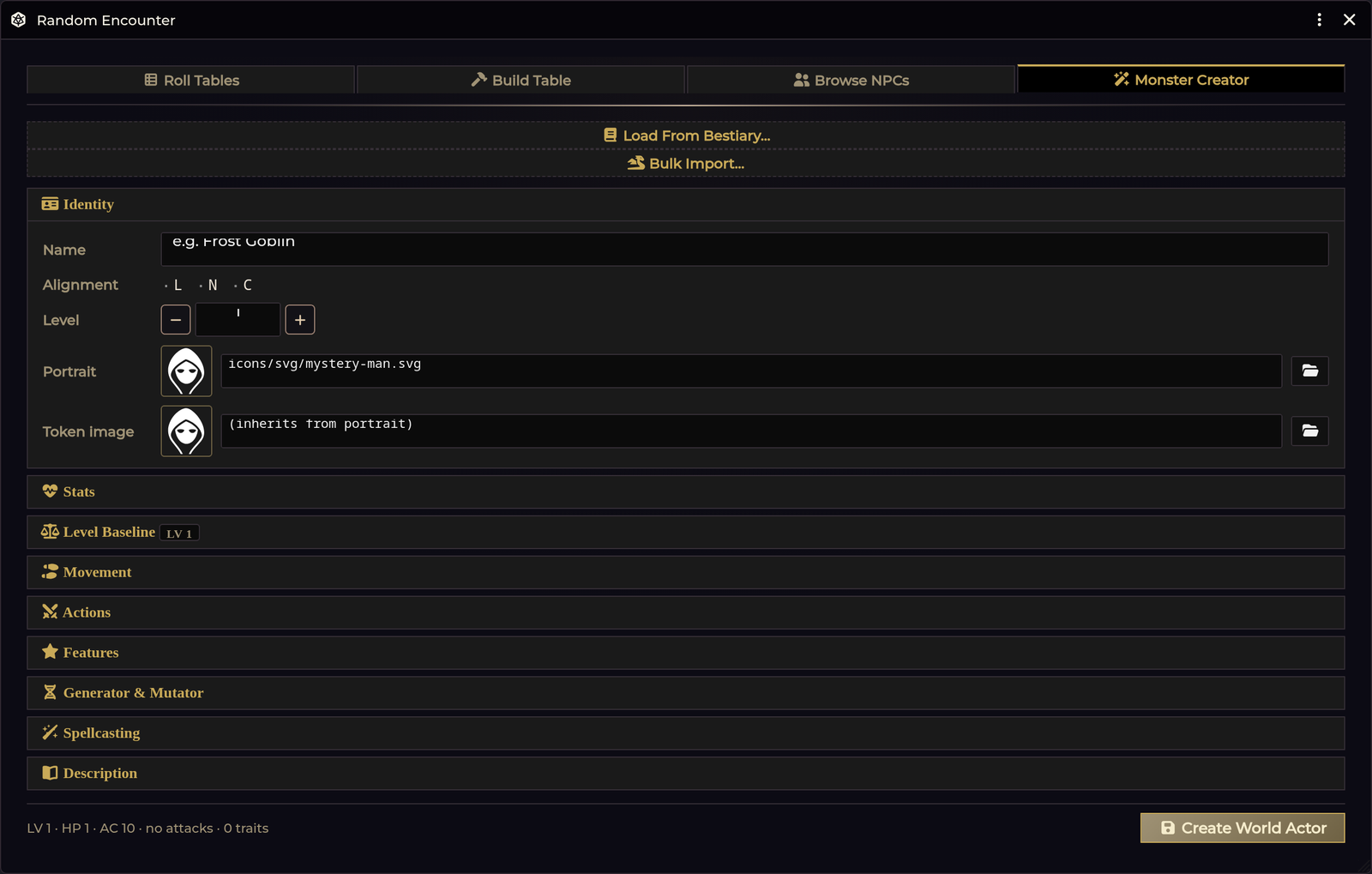
Opening it
| Route | How |
|---|---|
| Encounter Roller | Open the roller (Crawl Bar → Encounter) and pick the fourth tab |
| API | game.shadowdarkEnhancer.monsterCreator.open() |
Your draft persists when you switch tabs, so you can bounce to Browse NPCs to look something up and come back without losing work.
The stat block
Every section is editable:
| Section | Fields |
|---|---|
| Identity | Name, alignment (L / N / C), level (with − / + buttons) |
| Level Baseline | What the level's guidelines expect, and a one-click apply |
| Stats | HP, AC (with a free-text note), dark-adapted flag, all six ability modifiers |
| Movement | The system's move type, plus a free-text note |
| Spellcasting | Casting ability, spell bonus, spells per round |
| Actions | Attacks and special attacks, as removable rows |
| Features | Passive traits, as removable rows |
| Description | Free text |
Quick-pick catalogs
Actions and Features each have a preset catalog. Clicking a preset deep-clones it into your draft, so editing the copy never touches the catalog. You can always type a custom entry instead.
Actions (12): Fist · Bite · Claw · Longsword · Greataxe · Shortbow · Sling · Throwing Knife · Gaze · Breath Weapon · Poison · Sting
Features (14): Magic Resistance · Mob · Pack Tactics · Petrify · Regenerate · Brutal · Ambush · Keen Senses · Dodge · Burrow · Blood Drain · Disease · Poison · Undead
Spells
Attach spells with a debounced compendium search and a tier filter. Filter by system spells or browse extracted monster abilities from the Monster Spell Library. Matches appear as removable chips.
Art
Portrait and token art are set through Foundry's FilePicker. Leave the token art empty and it inherits the portrait.
Level Baseline
Answers "is this creature actually a level 6?" while you build. The section header carries the level it is judging (LV 6), and the table diffs your draft against it:
| Column | Meaning |
|---|---|
| Stat | AC, HP, Abilities, Attacks |
| Now | what the draft holds |
| Guideline | what the level expects |
| Δ | the difference |
Rows that already match are dimmed. Each row has a checkbox, and Apply to draft writes only the checked ones. Nothing reaches the world until you save. This is a draft edit, so there is no undo to manage.
If the draft has spells attached, a note reports that they push the creature above its written level (Written LV 5 → plays as LV 9), with a Use LV 9 button that adopts that level. The guidelines shown are for the effective level. Your written level is never changed behind your back.
HP is applied as level × 4.5 + CON, rounded up, so ticking Abilities
changes what the HP row promises. For the full rules on where the numbers come
from, how ability modifiers are clamped, and how to edit the table, see
Monster Level Guidelines.
Starting from an existing creature
The bestiary loader searches every world and compendium NPC and loads one into the draft. This is the fast path for variants: load Goblin, bump the level, add a feature, save as Goblin Chieftain.
Art is resolved intelligently on load, including community token mappings, so a loaded creature usually arrives with its art already attached.
Editing a creature in place
There is a second way in, and it behaves differently. Open in Creator on the token Quick Adjust panel loads that creature and remembers where it came from. A banner appears at the top of the Creator:
Editing Ogre (world actor) · Detach
The save bar changes to match, with Update Ogre alongside Save as New:
| Button | What it does |
|---|---|
| Update name | Writes your changes back to that creature. No duplicate is created. |
| Save as New | Creates a separate monster and leaves the original untouched. |
| Detach | Breaks the link. The save bar returns to Create World Actor. |
On an unlinked token the banner reads (this token only). You are editing that token's own copy, not the shared world actor.
Updating reconciles items instead of replacing them wholesale: an attack you did not touch keeps its identity. Item types the Creator does not author (Effects, Talents, gear) are left completely alone.
If the creature had a Quick Adjust restore point, updating clears it and says so. The restore point described the stats before the adjustment and can no longer be trusted once the Creator has rewritten those items.
Generator & Mutator
Two optional panels that read your own imported Core Rulebook tables from the managed pack:
| Panel | Source table | Shape |
|---|---|---|
| Generator | Monster Generator | d20 × 4 columns |
| Make It Weird | monster mutations | d12 × 3 columns |
Each set unlocks independently once all of its columns are imported and valid. Until then the panel shows exactly what is missing, with a one-click import that seeds the Importer Hub.
Roll or hand-pick a result per column, then either:
- Apply to the draft. The results are added as descriptive NPC Features only.
- Spawn a variant copy. Creates a separate mutated creature.
Generated results never change mechanics. Stats, attacks, movement, and spellcasting are left exactly as they were. The tables produce flavour, and flavour is what gets written. If you want a generated result to have teeth, add the mechanic yourself.
Applied results can be removed again per set.
Saving
Create World Actor validates the name, then creates a type: "NPC" world
Actor with the Attack / Special / Feature / Spell entries embedded as real items.
A live summary sits beside it (LV 1 · HP 1 · AC 10 · no attacks · 0 traits),
so you can see the creature's shape without expanding every section.
If the draft was loaded from a live creature, this button reads Update name instead and writes back to it. See Editing a creature in place above.
There is also a Bulk import shortcut that jumps to the paste-to-create monster importer for when you have a stack of stat blocks instead of one creature. See Importer Hub.
Troubleshooting
The Generator panel says a set isn't ready. All columns of that set must be imported and valid. The panel lists which ones are missing, ambiguous, or invalid. Click the import button to seed the hub with the right table.
Save does nothing. The name is empty. It is the only required field.
A loaded creature came in without art. Art resolution is name-based and falls back through aliases and fuzzy matching. Set it by hand with the FilePicker, or see Monster Token Art for the full art manager.
My draft vanished. Drafts survive tab switches within the roller, but not closing the window. Save before you close.
Applied generator results didn't change the creature's stats. That is by design. See the note above.
I saved and got a duplicate instead of updating the original. The draft was not linked to a creature. The link only exists when you arrive via Open in Creator from the token Quick Adjust panel. The bestiary loader deliberately does not link, because its job is building variants. Check the save bar: Update name means linked, Create World Actor means it will make a new one.
Save as New made a copy but my next save updated the original. It shouldn't. Save as New breaks the link, and the button reverts to Create World Actor. If you saw otherwise, the draft was re-linked in between (re-opening from Quick Adjust does that).
The Level Baseline section says everything matches, but the creature feels off. It only judges AC, HP, ability modifiers and attack items. Features, spells and special attacks carry a lot of a creature's real weight and are not scored. Spells at least get a note. See Monster Level Guidelines.
Apply to draft didn't change my ability modifiers. They were already inside the level's band, so the guideline had nothing to correct. Untick nothing and change the level to see them move.
Related: Monster Level Guidelines · Monster Spell Library · Random Encounters · Monster Token Art · Importer Hub