Downtime
What the party does between crawls. Pick a character, pick an activity, pay for it, roll the check, and read the result.
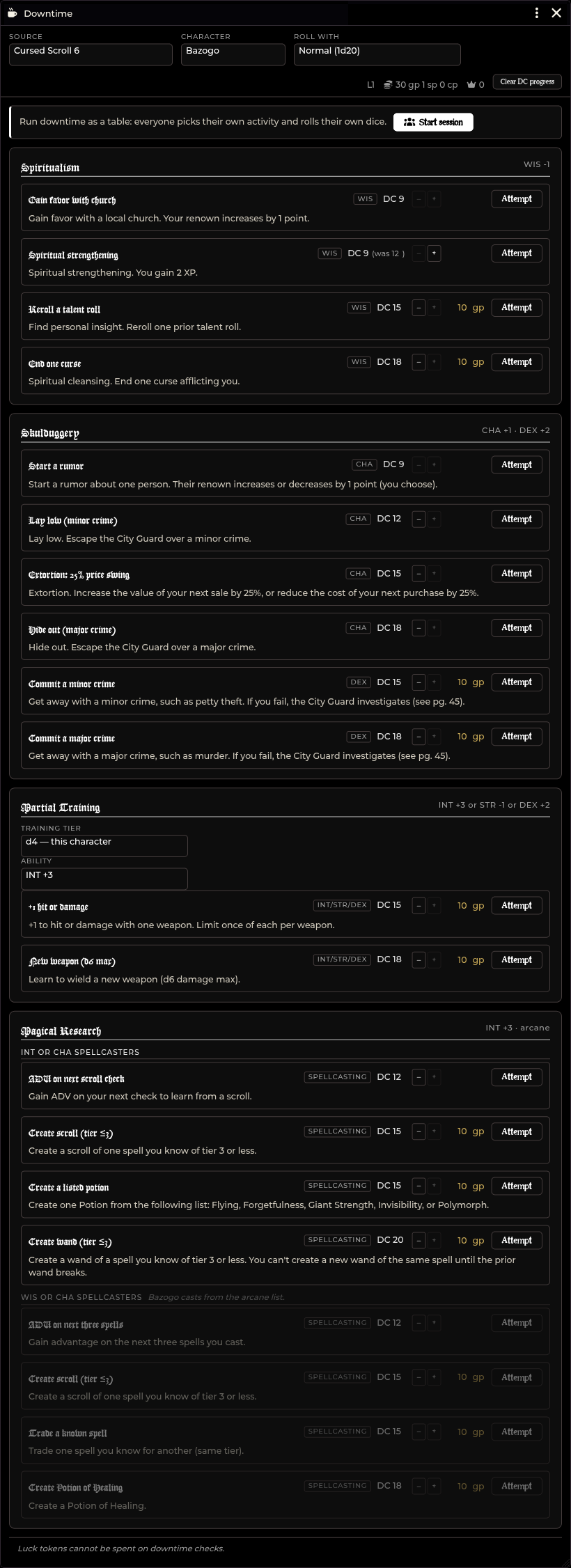
Opening Downtime
| Route | How |
|---|---|
| Forge & Loot menu | Click Forge & Loot on the crawl bar, then Downtime |
| API | game.shadowdarkEnhancer.downtime.open() |
As GM, you can open Downtime at any time.
Players can open Downtime only while a session is running. Outside a
session, players see There's no downtime session running right now. During an
active session, players also get an Open Downtime button directly on the
announcement card in chat.
A player's window lists only the characters they own. The GM window lists the entire party.
Running downtime at the table
Downtime runs in two modes:
- Session mode (recommended): Run downtime as a table. Every player picks their own activity and rolls their own dice simultaneously.
- Solo mode: Drive the whole party one character at a time as GM.
Starting a table session
- Open the Downtime window as GM.
- Select your imported book in the Source dropdown.
- Click Start session on the banner.
Starting the session pins that book for everyone and posts a Downtime card to chat with an Open Downtime button for your players.
Phase 1: Choosing
While the session is in the choosing phase:
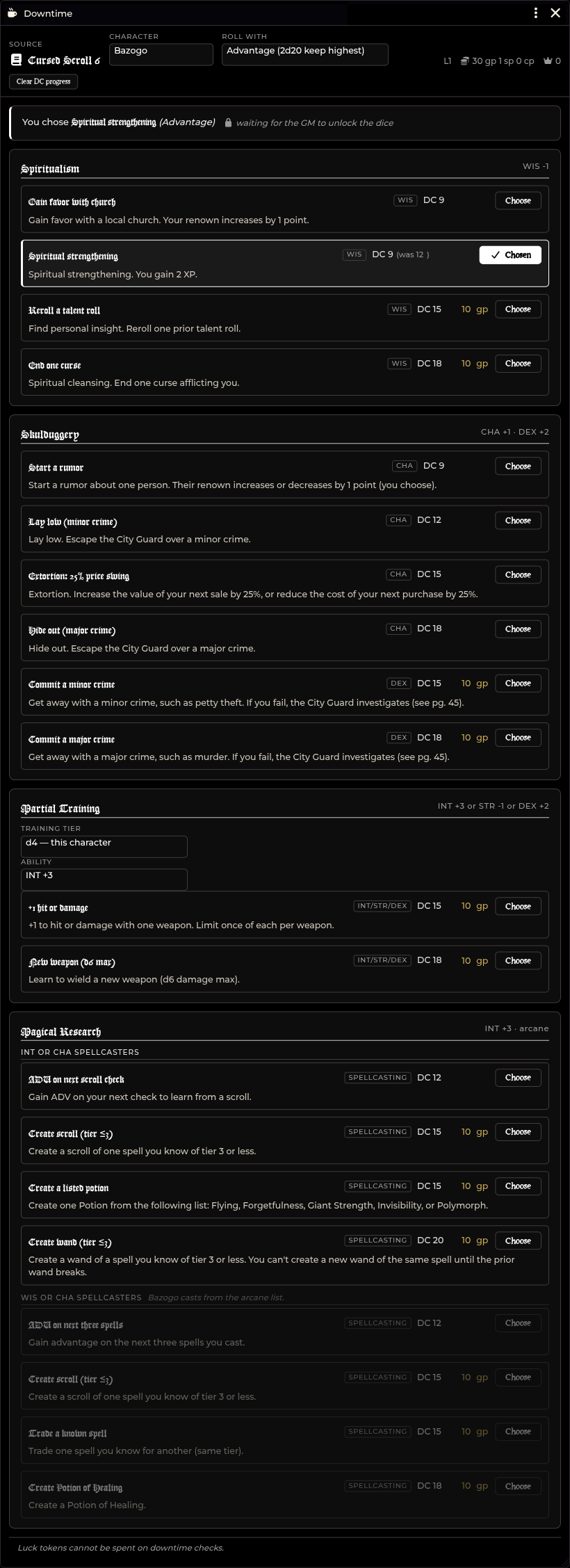
- Every activity row displays a Choose button and reveals its full unlocked outcome text. Players can read what an activity does before picking.
- Players pick one activity. Picking flags that row as Chosen.
- Players select their advantage state (Advantage, Normal, or Disadvantage) under Roll with before clicking Choose. This records their choice so you can see who claimed what before dice roll.
- Players see
waiting for the GM to unlock the dice.
Phase 2: Rolling
Once the party has made their choices:
- Click Lock & unlock dice in the GM control panel.
- Player picks freeze, and their buttons swap to Roll it.
- Each player clicks Roll it to roll their check.
You can click Re-open picks at any point if someone needs to change their selection.
How dice and security work
- Player dice roll locally: Checks run on the player's client with their own dice settings, 3D dice, and roll history.
- Server authentication: Picks and rolls travel over Foundry's authenticated user-query channel. The GM client verifies character ownership directly from the server before writing anything.
- One-shot tokens: Each pick generates a single-use token that the roll message must return. Old rolls or rolls from other characters are rejected.
- Authoritative settlement: The GM client reads the total from the chat message, verifies the DC and fees against the module rules, deducts coin, and applies outcomes.
The GM control panel
During an active session, the GM window displays a live status panel (for
example, 2 chosen · 1 rolled) with a row for each character:
| Control | What it does |
|---|---|
| Lock & unlock dice | Closes picking phase and unlocks Roll it buttons for players |
| Re-open picks | Returns the session to the picking phase |
| Clear | Clears one character's pick so they can choose again |
| Roll for | Rolls on behalf of an absent player (marked as (rolled by the GM) in chat) |
| End session | Closes the session for everyone and disables the chat card |
Ending a session changes the chat card to Downtime ended.
Running downtime solo
Outside an active session, you can drive downtime directly as GM.
- Select the character in the header.
- Set Roll with if applying Advantage or Disadvantage for this attempt.
- Click Attempt on the desired activity row.
When you click Attempt, the module executes these steps in order:
- Deducts the fee: Coin leaves the character's purse immediately.
- Rolls the check: The d20 check is rolled against the active DC.
- Updates the DC ladder: Failures step the DC down; successes reset it.
- Posts the chat card: Displays the roll breakdown, result, fee, and rules reminder.
Every card includes the reminder:
Luck tokens cannot be spent on downtime checks.
Applying Renown and XP solo
When resolving activities outside a session, mechanical awards are not applied silently. Result cards show manual action buttons:
| Activity slot | Button | What it writes |
|---|---|---|
| Gain favor with church | Apply | system.renown +1 |
| Spiritual strengthening | Apply | system.level.xp +2 |
| Start a rumor | +1 or −1 | system.renown on chosen character |
Renown updates route through the shared renown ledger. Rumors include a dropdown to select which party member gains or loses renown.
Awarded XP updates system.level.xp without modifying system.level.value.
What a success does
In a table session, successful checks apply their effects automatically. In solo mode, result cards provide buttons to apply them.
Immediate outcomes
These outcomes apply directly without extra choices:
| Activity slot | Result applied |
|---|---|
| Gain favor with church | +1 renown |
| Start a rumor | ±1 renown on the selected character |
| Spiritual strengthening | +2 XP (flags Level-up is ready if crossing 10 XP) |
| Extortion: 25% price swing | Arms a one-shot 25% discount or bonus in Merchant Shop |
| ADV on next scroll check | Active Effect: Downtime Research: next scroll |
| ADV on next three spells | Active Effect: Downtime Research: next three spells (3 uses) |
| Create Potion of Healing | Adds Potion of Healing directly to inventory |
Advantage buffs create standard Active Effects on the actor.
Outcomes requiring a choice
The result card prompts you with interactive buttons. Unavailable options are greyed out with hover explanations:
| Activity slot | Prompt | Notes |
|---|---|---|
| +1 hit or damage | Choose weapon and bonus type | Stamped on weapon item |
| +1 hit and damage | Choose weapon | Stamped on weapon item |
| Step up damage die | Choose weapon | Caps at d12; max 2 steps per weapon |
| New weapon / armor step | Choose gear type | Creates descriptive Training: <name> Talent |
| Create scroll (tier ≤3) | Choose known spell | Creates scroll item |
| Create wand (tier ≤3) | Choose known spell | Refused if unbroken wand already carried |
| Create a listed potion | Choose potion type | Creates potion item |
| Trade a known spell | Choose spell to drop and replace | Swaps known spells at same tier |
| End one curse | Choose active curse | Clears flagged curse effect |
If a character trains in equipment not found in your compendium packs, use the Not listed? Type it: box to enter custom names up to 60 characters.
Table-adjudicated outcomes
Outcomes with no automated rules (such as Lay Low, Hide Out, committing crimes, talent rerolls, or unflagged curses) print instructions for GM adjudication.
The extortion price swing
A successful Extortion: 25% price swing applies to that character's next Merchant Shop transaction:
- Purchases cost 25% less.
- Sales earn 25% more.
The swing is consumed only when a transaction completes. Failed purchases leave it armed.
The activities & DC ladder
The DC ladder
Every downtime DC follows this shared ladder:
9 · 12 · 15 · 18 · 20
- Failure steps down: A failed attempt lowers that slot's DC by one rung for the character's next attempt.
- Success resets: A successful attempt resets that slot back to its printed base DC.
- Clear DC progress: Resets all DC ladder steps for the active character.
As GM, use the − and + buttons beside any DC to adjust credit manually.
Spiritualism
All checks roll WIS.
| Slot | Check | Cost / Reward |
|---|---|---|
| Gain favor with church | WIS DC 9 |
Free · +1 renown |
| Spiritual strengthening | WIS DC 12 |
Free · +2 XP |
| Reroll a talent roll | WIS DC 15 |
Paid |
| End one curse | WIS DC 18 |
Paid |
Skulduggery
Deceptions roll CHA; theft and physical crimes roll DEX.
| Slot | Check | Cost / Reward |
|---|---|---|
| Start a rumor | CHA DC 9 |
Free · ±1 renown |
| Lay low (minor crime) | CHA DC 12 |
Free |
| Extortion: 25% price swing | CHA DC 15 |
Free · 25% shop price swing |
| Hide out (major crime) | CHA DC 18 |
Free |
| Commit a minor crime | DEX DC 15 |
Paid (CS6) / Free (WR) |
| Commit a major crime | DEX DC 18 |
Paid |
Martial Training
Tiered by class hit die (d4, d6, d8+). All checks roll INT/STR/DEX (highest modifier selected by default). All slots are paid.
| Tier | Slot | Check |
|---|---|---|
| d4 | +1 hit or damage | INT/STR/DEX DC 15 |
| d4 | New weapon (d6 max) | INT/STR/DEX DC 18 |
| d6 | +1 hit and damage | INT/STR/DEX DC 12 |
| d6 | New weapon or armor step | INT/STR/DEX DC 15 |
| d8+ | New armor or weapon | INT/STR/DEX DC 9 |
| d8+ | +1 hit and damage | INT/STR/DEX DC 12 |
| d8+ | Step up damage die | INT/STR/DEX DC 15 |
Anyone can change the Training tier dropdown to view other tiers. Players cannot attempt tiers outside their class.
Magical Research
Visible only to characters recognized as spellcasters.
| Subsection | Slot | Check | Cost |
|---|---|---|---|
| INT or CHA | ADV on next scroll check | Spellcasting DC 12 |
Free |
| INT or CHA | Create scroll (tier ≤3) | Spellcasting DC 15 |
Paid |
| INT or CHA | Create a listed potion | Spellcasting DC 15 |
Paid |
| INT or CHA | Create wand (tier ≤3) | Spellcasting DC 20 |
Paid |
| WIS or CHA | ADV on next three spells | Spellcasting DC 12 |
Free |
| WIS or CHA | Create scroll (tier ≤3) | Spellcasting DC 15 |
Paid |
| WIS or CHA | Trade a known spell | Spellcasting DC 15 |
Paid |
| WIS or CHA | Create Potion of Healing | Spellcasting DC 18 |
Paid |
Charisma casters toggle between Arcane and Divine lists using the
Spell list: buttons.
Unlocking activities from your book
The module provides activity skeletons, DCs, and costs. Full outcome text must be imported from your copy of Cursed Scroll 6 or Western Reaches Players Guide.
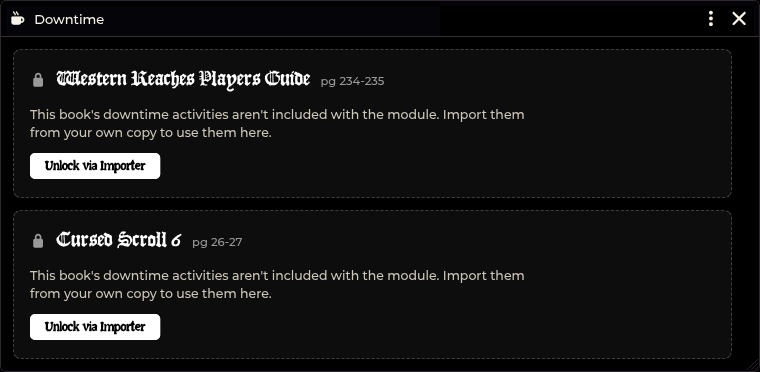
Importing via Importer Hub
- Click Unlock via Importer on the locked book card (or open Importer Hub and set Importing to Downtime).
- Select your Book (Cursed Scroll 6 or Western Reaches Players Guide).
- Paste the full spread pages into the text box and click Parse.
- Click Unlock outcomes to save.
Pastes require specific sub-headings to match entries correctly:
| Activity | Required sub-heading line |
|---|---|
| Martial Training | Tier line: d4. INT, STR, or DEX Check (one per tier) |
| Magical Research | Section line: INT or CHA Spellcasters / WIS or CHA Spellcasters |
| Skulduggery | Check line: CHA Check or DEX Check |
Importing replaces stored text for that book. If you ever need to re-import, paste the full spread.
Sources & costs
| Source | Pages | Attempt cost |
|---|---|---|
| Cursed Scroll 6 | 26–27 | 10 gp × character level |
| Western Reaches Players Guide | 234–235 | 50 gp flat |
- Fees are charged per attempt, win or lose.
- Characters without enough gold cannot select paid activities.
- Fees log to the Session Recap under purchases.
The downtime log
Downtime records attempts in two locations:
- Session Recap: The Session Recap Downtime tab groups attempts by player with attempt counts and costs. Exports directly to Discord markdown.
- Downtime Log Journal: A permanent journal entry (
Downtime Log) created at the root of your Journal directory, ordered by day with newest attempts first.
Data storage reference
| Data | Storage location |
|---|---|
| Unlocked text | downtimeContent world setting |
| Active session state | downtimeSession world setting |
| DC ladder progress | flags["shadowdark-enhancer"].downtime.steps on actor |
| Caster list choice | flags["shadowdark-enhancer"].downtime.casterList on actor |
| Extortion price swing | flags["shadowdark-enhancer"].downtimeExtortion on actor |
| Weapon training history | flags["shadowdark-enhancer"].downtimeTraining on weapon |
| Permanent log | Downtime Log JournalEntry |
Troubleshooting
The window displays only locked cards.
You have not imported downtime text yet. Click Unlock via Importer and paste
the downtime pages from your book.
\"Your GM's Foundry tab needs a reload before downtime actions can land.\"
The GM's active Foundry tab is running an older session script. Have the GM
refresh their browser tab (F5 or Ctrl+R).
\"There's no downtime session running right now.\"
A player attempted to open Downtime outside an active session. Start a session
from the GM window.
A player cannot see the \"Roll it\" button.
The GM has not clicked Lock & unlock dice. The player must wait until picks
are locked.
A player was absent for downtime.
Use Roll for in the GM control panel to execute their attempt. The chat
message will record (rolled by the GM).
\"You don't own that character.\"
Foundry verified that the user sending the action is not assigned Owner
permissions for that actor. Assign character ownership in Foundry user config.
A choice button is greyed out.
The character cannot take that specific reward (for example, a weapon already
has that training bonus, or damage is already stepped to d12). Hover over the
button to see the exact reason.
Related: Importer Hub · Merchant Shop · Session Recap · Party XP · Crawl Strip & Crawl Bar