Loot & Treasure
Generate a hoard for a party level, then let the party sort it out: post it as a chat card players race to claim, or drop the whole result on the map as pickups. No need to assign it to one player. You can still hand a hoard straight to a single character when you want to.
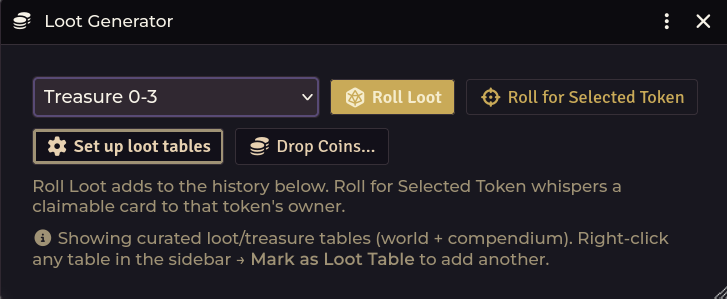
Opening it
| Route | How |
|---|---|
| Crawl Bar | Forge & Loot → Loot Generator (the menu opens on either click) |
| API | game.shadowdarkEnhancer.loot.open() |
Setup: bind your treasure tables
The module ships no treasure tables. They are book content, so you supply them. Until you bind some, the generator has nothing to draw from, and you get a one-time nudge at world load saying so.
Open the generator and click Set up loot tables. There are four tiers:
| Tier | Party level |
|---|---|
| Treasure (Levels 0–3) | 0–3 |
| Treasure (Levels 4–6) | 4–6 |
| Treasure (Levels 7–9) | 7–9 |
| Treasure (Levels 10+) | 10 and up |
Bind a RollTable to each. If you have imported the system's own Treasure 0–3 table, Loot Setup binds it in one click, enhanced and linked.
You can also add extra tables to the generator's picker. Right-click a table in the sidebar → Mark as Loot Table. World tables get a flag, while compendium tables are recorded in a setting instead, since a pack table can't be flagged in place.
Generating a hoard
The window is table-driven: pick a loot table from the dropdown, then choose how to deliver the result.
| Control | What it does |
|---|---|
| Roll Loot | Roll the selected table and add the result to the history below |
| Roll for Selected Token | Roll and whisper a claimable card to that token's owner, the fastest way to hand loot to one player |
| Set up loot tables | Bind a table per treasure tier (see above) |
| Drop Coins… | Drop a coin pile onto the canvas for anyone to pick up |
The dropdown lists curated loot/treasure tables from both world and compendium. To add another, right-click any table in the sidebar and choose Mark as Loot Table.
A hoard yields coins (gp / sp / cp) and items. Every result in the history has its own delivery controls, and you are never forced to pick a player. The Give dropdown defaults to Party (claim in chat), so the whole party decides who takes what.
| Control | What it does |
|---|---|
| Post to Chat | Post the result as a claimable card the party races to claim |
| Drop on Ground | Drop the whole result on the canvas for the party to divvy up in person. Items become pickup-able tokens, coins a pile |
| Give, dropdown on Party (claim in chat) (the default) | Posts the claimable card, same as Post to Chat |
| Give, dropdown on a character | Hands the batch straight to that one actor: items created, coins added, no card |
The claimable chat card
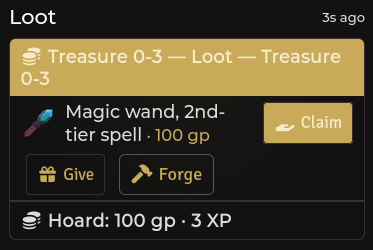
Post the hoard to chat and the first player to click Claim takes it.
- Each item is claimed individually and locked to one character.
- Coins are assigned to a single chosen character and added to their
system.coins. - First claim wins. Claims are processed by exactly one GM client, and a claim in flight is locked before the write, so two players clicking at the same instant cannot both walk away with the sword.
Drop on the ground
Drop on Ground puts the whole result on the canvas instead: every item becomes a pickup-able token and the coins a pile, clustered at your controlled token (or the viewport centre).
Players walk over and grab what they want from the token HUD's pick-up button, so loot division happens in the fiction rather than in a dialog. This uses the same token-HUD pickup players already use for Drop Coins… piles and for items they drag onto the map themselves.
Direct delivery
Pick a character in the Give dropdown and press Give to hand the batch straight to that actor: items created, coins added, no card.
How loot rows become Items — precise resolution
A loot table row is usually prose with a price—such as Unopened bottle of
exceptionally potent Murgazi wine (25 gp)—not a bare item name. The module
resolves that row to a compendium Item in two whole-name tiers and refuses
everything else.
This strict matching is deliberate: a false positive (mapping Murgazi wine to
the 1 gp system Bottle) silently hands the player the wrong object, while an
unresolved row keeps its full text and can be fabricated or linked by hand.
| Outcome | Meaning | Carries a link? |
|---|---|---|
exact |
Stripped of prices, the row is the Item's name (case/spacing/quote-folded) | Yes |
alias |
Matches the name modulo anchored normalizations (leading counts/articles, trailing parentheticals, or plural endings) | Yes |
ambiguous |
More than one distinct Item matches at the same tier (e.g. 3 bolts (2 gp) matching both Bolt and Bolts) |
No (resolves to nothing) |
unresolved |
No Item matches at either tier | No |
Anchored, composable folds
Alias normalization operates strictly at the start, the end, or the final word of a phrase. It never shortens a phrase to an arbitrary interior word. Multiple rules can apply together:
Unopened bottle of exceptionally potent Murgazi winefolds to itself, never toBottle.a flask of exceptionally fine oilnever matchesFlask.2 daggers (steel)resolves todaggervia count + parenthetical + plural normalizations working together.- Loose containment is refused by design, preventing unintended matches on generic sub-words.
Short names and punctuation
Three-character item names (Axe, Net) resolve cleanly at the exact tier.
Price notations, punctuation, and trailing qualifiers like each are stripped to
a fixed point before matching:
Dagger (1 gp).resolves as anexactmatch toDagger.- For coin-like phrases (
Gem shard (10 gp) each), the resolver stripseachcleanly, but classification may route the result as currency rather than minting a fabricated item.
Compendium loading order
Candidate Items are loaded from all installed Item packs, filtered to the four
loot types (Weapon, Armor, Potion, Basic), and deduped by lowercase
name:
- System compendiums first (
shadowdark.gear, etc.) - World and module packs next (including
sde-items)
If names collide, the system compendium entry takes precedence; module imports
fill in the gaps. The index is cached per session and invalidated automatically
after bulk compendium imports or via game.shadowdarkEnhancer.linker.invalidate().
For API callers, game.shadowdarkEnhancer.loot.resolve(text) returns the
detailed resolution status, query string, and candidate list for ambiguous
matches. See the API documentation.
Generated treasure Items — stable identity and replace-always reruns
Certain specialized treasure tables generate custom Items into the managed
Items pack (world.shadowdark-enhancer--items / sde-items).
Inside this pack, any document flagged with flags["shadowdark-enhancer"].generated = true
and a stored generatedItem block follows a replace-always contract:
re-running the generator replaces the document in place under the same identity.
- Stable identity: Identity is computed as
FNV-1a/32hash of<source>:<normalized name>. Renaming an item in the source table assigns it a new identity; it does not delete the previous item. - Monster spell collision protection: Generated Monster Spells share the
same pack but use a preservation model (hand edits are kept as curated
conflicts). If a generated treasure item collides with a generated monster
spell, the treasure generation is refused as a
name-collisionand the spell is preserved intact. - Standard imports unaffected: Items outside the managed pack or lacking the
generatedflag are governed by standard provenance rules and are never overwritten automatically. - Folder preservation: Re-running generation updates content but leaves the document in whichever folder you moved it to.
- Third-party flags preserved: Unrecognized top-level flag blocks (such as
shadowdark-extrasalignment data) are carried over onto the updated document during reruns. - ActiveEffect stability: Embedded ActiveEffects are canonicalized so reruns without changes maintain stable effect IDs without unnecessary churn.
- Collision reporting: Hash collisions or duplicate document IDs in the pack are reported as refusals during planning rather than silently corrupted.
Sea Wolf Plunder materialization
When you link or import the Sea Wolf Plunder From Distant Lands table (Cursed
Scroll 3 p68), the loot catalog routes it through the dedicated Sea Wolf
materializer (scripts/loot/sea-wolf-plunder.mjs):
- Source recognition: Requires table manifest ID
cs3/sea-wolf-plunder(or normalized name Sea Wolf Plunder From Distant Lands with CS3 source tagging). Tables tagged with other sources (like CS1 or CS2) are rejected. - 20 managed Items: Materializes the 20 published items into
sde-itemsunder theCursed Scroll 3 / Treasurefolder. - Preserved display: Item names strip the trailing gold value (e.g.,
A wavy,
  silver dagger with a crescent moon pommel
), while the RollTable'sTableResultretains the full published phrase with price ((75 gp)) and links to the item'sdocumentUuid. Pure currency rows (100 gp) remain plain text results. - Curated artwork: Items receive reviewed icons from the CS3 curated map.
- Safe updates and rollback: Table rows update in place under stable IDs. Source rows are snapshotted before writing; if an error occurs, the snapshot is restored and replacement orphans are cleaned up.
Dead Bandit Loot materialization
When linking In a Dead Bandit's Hand, You Find... (Cursed Scroll 2 p68), the
dedicated materializer (scripts/loot/dead-bandit-loot.mjs) generates 20
custom items in sde-items:
- Source recognition: Requires manifest ID
cs2/in-a-dead-bandits-handor the exact table title with CS2 source tagging. - Canonical item names and feature text: Generated Items use their canonical
base name (
Cursed eye token,Burlap bag), while the special feature or hazard is placed directly into the Item description (DISADV on next check or attack roll,tied shut with an angry cobra inside). - Raw TableResult display: The RollTable's
TableResultdisplays the complete source phrase while referencing the item's UUID. - No artificial prices: Since the published CS2 table has no gold values, none are invented. Interior currency mentions remain in the item description.
- Curated artwork: Items receive reviewed icons from the CS2 curated map.
- Safe writes and rollback: Rows are snapshotted before update and restored if any error occurs during writing.
Diabolical Treasure materialization
When linking Diabolical Treasure (Cursed Scroll 1 p68), the materializer
(scripts/loot/diabolical-treasure.mjs) converts the published 20×20
Item/Feature matrix into 20 paired generated Items:
- Source recognition: Requires manifest ID
cs1/diabolical-treasureor the exact table name with CS1 source tagging. - Census validation: Requires the reviewed 20-row census (or the complete 400-cell census). Incomplete or miswired table rows fail closed before any writes occur.
- Magic items with hidden features: Creates 20 Basic items flagged as magic
items and treasure (
system.magicItem: true,system.treasure: true) underCursed Scroll 1 / Treasure. - Identification gating: Items are created with
identification.identified =
  false
. The base name and physical description are public, while the magical feature resides inidentification.descriptionand is revealed when you identify the item. - 1d20 TableResults: The RollTable formula is converted from
1d400to1d20, with 20 name-only rows linking to the generated Items by UUID. - Curated artwork: Items receive reviewed icons from the CS1 curated map.
- Safe rollback: TableResult updates and formula reductions run through the snapshot-restore safety layer.
Programmatic access
Developers and macros can access the generator API directly:
game.shadowdarkEnhancer.loot.generated.identity(source, name): Returns the deterministicfnv1a32:...identity string.game.shadowdarkEnhancer.loot.generated.plan(desired, { source }): Generates a read-only reconciliation plan reporting creates, updates, and refusals without writing to the database.game.shadowdarkEnhancer.loot.generated.reconcile(desired, { source }): Executes the reconciliation plan (GM-only), creating or updating documents in the managed Items pack.
Loot drops on combat end
Off by default. Turn on Loot drops on combat end in module settings if you want defeated enemies to drop hoards automatically.
When combat ends:
1. Each defeated NPC rolls percentile dice against Loot drop chance (%)
(default 50%).
2. On a success, it rolls on the treasure table corresponding to its level tier
(or a custom table assigned to that NPC).
3. The result is posted to chat as a claimable card. Only the active GM client
processes drops to prevent duplicate cards.
Per-NPC loot overrides
With combat loot drops enabled, every NPC sheet displays a GM-only Loot button in its header. Clicking it opens a configuration dialog where you can:
- Select a specific loot table for that monster.
- Set a custom drop chance percentage (set to
0%to ensure the monster never drops loot). - Leave fields blank to inherit world defaults.
Per-encounter loot mode
If you prefer a single consolidated drop card per battle:
- Set Loot drop mode to Per encounter (one card).
- The entire encounter makes a single drop check.
- On a hit, a single card is generated using the level of the highest-level defeated NPC. That NPC's custom loot table settings still apply.
You can also use the Drop Coins… button to drop a coin pile directly onto the canvas as a token. Characters can pick up coins using the token HUD without generating a chat card.
Treasure XP
Generated treasure includes gold values that feed into the XP award system:
| Setting | Default | Meaning |
|---|---|---|
| Treasure XP threshold — normal (gp) | 10 |
Minimum gold value required to award normal treasure XP |
| Treasure XP threshold — fabulous (gp) | 150 |
Minimum gold value to count as fabulous treasure (higher XP) |
These values integrate with Party XP, where you can drag a claimed loot item directly into the XP award window.
Troubleshooting
"Your GM's Foundry tab needs a reload before loot claims can land."
(Or …before item drops and pickups can land.) Claiming, dropping, and picking
up loot all execute on the active GM's client. If the GM's tab has been open
since before a module update, it may be running outdated handler code. Have the
GM reload their browser tab (Ctrl+Shift+R).
Monsters never drop loot when combat ends.
Loot drops are off by default. Enable Loot drops on combat end in module
settings, verify that Loot drop chance (%) is greater than 0, and ensure
treasure tables are bound to each level tier in Set up loot tables.
Generating produces coins but no items.
No table is bound for that level tier, or the bound table contains no item links.
Click Set up loot tables in the Loot Generator to bind valid tables.
A table is bound but rolls produce plain text instead of items.
The table's rows are not linked to compendium items with @UUID links. Tables
imported via the Importer Hub are linked automatically.
Hand-authored tables must have @UUID links added to their results.
Note on sub-tables: Rows defining item choices in prose (such as Meteorite
1d4: 1. lute, 2. viol, 3. harp, 4. flute) are evaluated dynamically and mint a
real item (Meteorite harp) without requiring pre-existing links.
Two players both claimed the same item.
Claims are serialized on the active GM client with an in-flight lock, preventing
duplicate claims. If you encounter a duplicate claim, please report it on the
issue tracker.
A player clicked Claim and nothing happened.
Loot claims are processed by the GM client. If no GM is currently connected to
the world, claims cannot be resolved.
Coins were assigned to the wrong character.
Coin assignment is a separate GM control on the claim card. Select the desired
character from the dropdown before clicking Assign.
Dragging an item onto the map creates an unwanted extra image.
If you use Monk's Active Tile Triggers, its "drop item creates a tile" feature
may trigger on the same canvas drop. Shadowdark Enhancer intercepts item drops to
create pickup tokens. Reload your browser (Ctrl+Shift+R) after updating.
The "set up your loot tables" notice keeps appearing.
This prompt appears once per world when fewer than four treasure tiers are
bound. Once you have opened Loot Setup or dismissed the prompt, it will remain
silent.
Related: Magic Item Forge · Party XP · Merchant Shop · Importer Hub